2020년 8월 31일 월요일

Annoying "Under-voltage detected!" on RPI

During usual work, "Under-voltage detected!" message along with flash icon on right-up corner is popped up unexpectedly or frequently.

This message comes from linux kernel, and is caused by improper Power Supply, so can't be removable.

Only solution is that 

Get a proper Power Supply Unit (not just any phone charger nor your PC/Mac's USB port!)

If RPi3B or RPi3B+ : use 5v 2.5A and up, cable must be 18AWG or at least 1.0mmsq
if RPi2B : use 5v 2.0A and up, cable must be 18AWG or at least 1.0mmsq
if RPi1B+, RPiZ/W : use 5v 1.5A and up, cable must be 20AWG or at least 0.75mmsq
if RPiA+ : use 5v 1.0A and up, cable must be 20AWG or at least 0.75mmsq

5v must not go below 4.9v nor beyond 5.15v

Reference


First things to do after installation of raspberry pi OS

Make sure the internet connection to update old packages by blind period between time to make official OS and current status.

# sudo apt update; sudo apt full-upgrade

In order to reduce sd-card usage down as much as possible, in my case these commands may be helpful after installation.

# sudo apt purge libreoffice* thonny* smartsim* scratch* sonic-pi* wolfram-engine* geany* mu-editor*
# sudo apt autoremove
# sudo apt clean

then, to fuse firmware is needed to improve the performance of your raspberry pi.

# sudo rpi-update


2020년 7월 17일 금요일

[번역] 현대 자동차 소수 연료전지(fuel cell) 트럭 방향으로 밀어 붙이다. by Lewin Day

Originated at https://hackaday.com/2020/07/16/hyundai-makes-push-towards-fuel-cell-trucking/


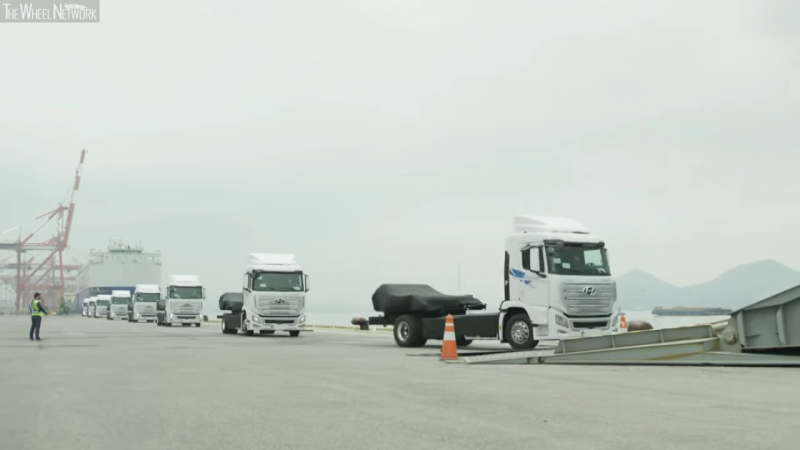
현대 자동차는 상업용 운송차 시장에서 배터리 전기차 트럭에 대응하여 수소연료전지(fuel-cell) 기반의 중장비 트럭을 출고하기 시작했다.

배터리 전기 차량은 좀 더 일반적으로는 전기차는 일상에서 볼 수 있을 정도로 세상에 나타나기 시작하였다. 하지만, 자연친화적 운송으로 전환할때 도시에서만 적용되는 게임이 아니다. 수소연료전지(Fuel cells)은 전기를 생산하는데 수소 탱크를 사용하고 부산물로 물(H2O)을 양산하기 때문에 당황스러운 충전 시간이 필요없이 오랫동안 주변에서 오염을 제거하기로 기대를 받아 왔다. 그렇지만 지금까지 큰 영향력을 만들어 내지 못하였다. 그러나 현대 자동차는 여전히 이러한 개념에 가치가 있다고 생각하고 있다. 그리고 그에 대한 더 많은 증거를 제시하는 XCIENT Fuel Cell 트럭을 개발 하였다.

32KG의 수소로 400KM

그져 단순한 포로토타입이 아니고, 현대 자동차는 리스 고객에서 많은 양의 자동차를 이미 출하하고 있다.

현대 자동차는 이 프로젝트에 집중 투자 해왔다. 상업용 중장비 회사에서 사용할 목적으로 스위스에 첫번째 10대의 수소연료전지(Fuel Cell) 트럭을 출하하였고, 올해 말까지 필드 테스트에 40대의 트럭을 추가하려고 계획하고있다. 2025년까지 1600대의 트럭을 운용하기를 목표로 하고 있다. 이 의미는 년단위로 수백대의 주문에 생산가능한 역량을 의미한다. 이 클라스의 트럭이 전세계적으로 년당 수백만대의 판매량을 보이는 것에 비하면 미약하다. 하지만, 그럼에도 불구하고 기술 개발에 강력한 의지를 보여주고 있다.

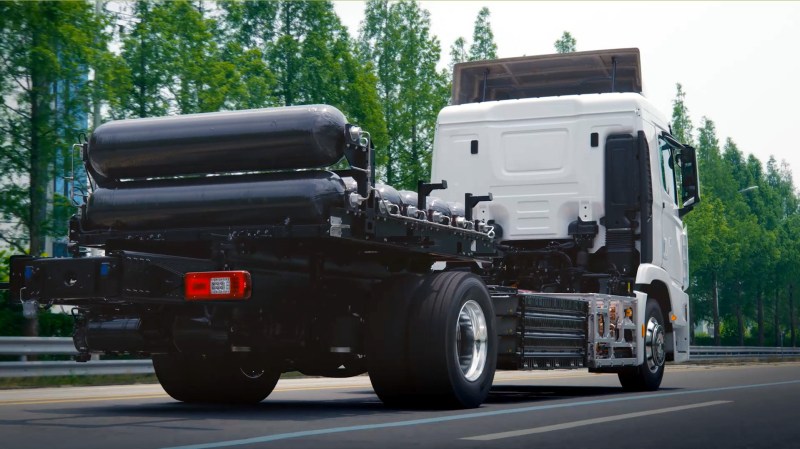
32.1kg의 수소로 400Km 운용 능력은 트럭이 일반적인 장거리 운송 범위를 충분히 넘어 선다. 단기적으로 디젤 대형 굴착 장치와 경쟁 할 가능성은 없지만, 짧은 충전 시간은 모든 전기차가 가지고 있는 showstoppers(관심을 거두게 하는 요소) 중 하나를 극복한다. 현대 자동차의 다음 목표는 재충전 사이의 거리가 1,000km에 도달하는 것이다. 이것은 일반적인 트럭의 교대 길이에 가까워지게 된다. 트럭은 190kW의 총 에너지를 위해 95kW를 땡겨쓸 수 있는 두 개의 수소연료전지(Fuel Cell)를 사용한다. 이것은 큰 수량이 아니며, 이러한 차량에게 더 중요한 것은 토크이다. 전기 모터가 제공하는 즉각적인 twist(???)를 가지고 현대의 원동기는 이와 관련하여 전통적인 디젤 경쟁자와 차별되는 자신의 영역을 구축해야 한다.

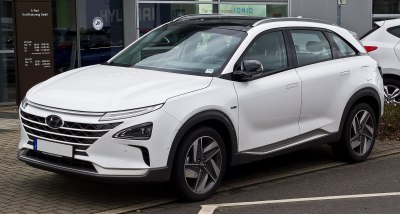
그러나, 이 회사는 수소연료전지(fuel cell) 기술에서 이방인이 아니다. 토요타와 같이 그들은 몇년동안 이 시장에 존재하였다. 현대 자동차의 첫 번째 큰 이정표는 과거 2001년의 산타페 Fe FCEV의 개발이었다. 그 이후로 그들은 전세계의 선정된 시장에서 새로운 모델로 좀 더 갈고 닦아 왔다. 넥소는 5.6kg의 수고로 570km의 주행거리를 제공하는 최근의 성과이다. 이미 생산이 준비 되어 있지만, 아직 전세계적으로 판매를 개시한 것은 아니다. 제한된 인프라는 미국에서의 차량 소유자가 특혜를 위해서 캘리포니아로 이주해야 한다는 것을 의미합니다.

넥소는 수소연료전지 기술을 가지고 있는 현대적인 SUV 최신모델이다. 그러나, 알맞은 인프라가 있는 지역에 있지 않다면, 여러분은 하나 구매하는 것이 어렵다는 것을 알게 될것이다.

대체 연표 트럭의 출현

전세계의 도시들은 지구 기후와 지역 오염의 영향으로 화석연료 차량을 제거하도록 밀어 붙이고 있다. 배터리 전기 차량은 전통적으로 이러한 문제점의 해결책으로써 존재하여 왔지만, 긴 충전 시간과 비용은 비판자들을 끌어 모으고 있다. 인프라가 이러한 문제점을 해결하기 위해서 전세계적으로 구축되고 있지만, 많은 사람들에게서 드러나는 방해 요소로 뚜렷하게 대두되는 사안들이 남아있다.

수소연료전지(Fuel Cell) 차량은 배터리 의존적인 차량을 가지고 있는 사람들에게서 돌고있는 매력적인 특성을 가지고 있다. 시중에 있는 배터리가 최선의 경우 몇 십분의 의미있는 충전시간을 가지고 있는 반면에, 수소 연료 전지(fuel cell) 차량은 기존의 화석 연료 차량의 충전 시간과 동일한 시간안에 수소 탱크를 다시 채울 수 있다. 이상적인 수소 에너지 세상에선 집에 자신 소유의 충전기를 가질 필요가 없다. 그져 간단히 수소 주유소로 가서 추가적으로 연료 뚜껑만 위로 올리면 된다. 이 차량은 아무런 이산화 탄소 배출이 없는 긍정적은 요소를 유지한다. 미세먼지나 질소 산화물같은 다른 해로운 오염물은 말할 것도 없다. 이러한 점은 까다로운 배출규제를 유지하면서 상품들을 주기적으로 배달해야 하는 과밀 도시 중심부에서는 중요한 부분이다.

수소연료전지(fuel cell) 기술의 두 개의 주요 단점이 남아 있다. 첫 째는 인프라. 지금 시점에서 전세계적으로 단지 듬성듬성 분산되어 있는 한줌의 수소 충전소만 있다. 2014이후로 수소연료전지 차량이 시장에 존재하여 왔지만, 전 세계의 몇몇 지역만이 이들을 사용할 수 있게끔 해주는 필요 조치를 해왔다. 경쟁자인 전기차에 비해 적은 기반을 가지고는 빠른 시일 안에 변화를 기대하기는 쉽지 않다. 또 다른 하나는 수소 생산이다. Steam reforming 기술(CH4 + H2O ⇌ CO + 3 H)은 저렴하지만, 배출 측면에서 공정의 오염원으로 탄화수소를 포함하고 있다. 이러한 점은 깨끗한 운송 수단이 되도록 하는 이득을 다소 제거하는 요소이다. 대체제로써 물의 전기 분해(electrolysis of water)가 수소를 생산하는 또 다른 한가지 방법이다. 이것은 반응로의 에너지로 사용되는 발전과정 만큼이나 깨끗하다. 하지만, 더 비용이 들어 간다. 그리고 단순히 직접 배터리 전기 차에 충전하는데 전기를 사용하는 것 보다 효율을 좋지 못하다.

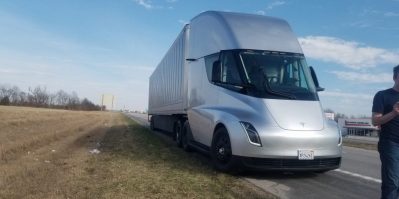
Tesla Semi 같은 배터리 전기차는 현대 자동차의 수소연료전기 트럭의 주요 경쟁자일 것이다.

그러나 현대자동차의 트럭의 중장비 영역은 수소연료전기 기술에 있어서 좋은 기회이다. 인프라의 문제점은 상업용 fleet(함대)에 사용되는 차량에 있어서 덜 중요하다. 그들은 차고에서 정기적으로 운영되기 때문에, 통근하는 인구를 위해 모든 곳에 수소 충전소를 설치하는데 드는 것에 비해, 적은 수의 충전소를 더 감당할 수 있는 비용으로 화물 네트워크에 설치할 수 있다. 추가적으로, 프로젝트의 기후적인 이득을 유지하기 위해 회사가 깨끗한 공정에서 생산된 수소를 확보하도록 할 수 있다. 또한 중장비 차량이 도시 주변이나 안에서 운용될 수 있도록 하는 기대되는 방법이다. 지금은 더많은 오염원을 발생하는 차량은 금지하고 있다. 배터리 전기 트럭은 이 시장에서 어렵게 경쟁하고 있지만, 느린 충전시간의 장벽을 떨쳐버리기를 원하는 회사에게 수소 연료전지는 설득력있는 대체제를 제공할 것이다.

수소연료전지가 통근 영역의 시장에 있어서도 배터리 전기차를 넘어 설 수있는 기회가 점점 좁혀져 가고 있어 보인다. (비록 테슬라, 니싼, 다른 자동차 메이커들이 수천대 이상 많이 수소 경쟁자 보다 많이 팔요 있지만,) 그러나, 깨끗한 트럭의 전쟁은 단지 시작이 뿐이다. 재충전 문제의 뚜렷한 해결책과 주요 화물 도로를 따라 수소 인프라를 구축하는 가능성을 가지고 여러분의 다음번 온라인 주문을 배송하는 트럭이 수소연료전지로 구동될 가능성이 매우 큽니다.


2020년 2월 21일 금요일

Attempt to remove annoying hanging debian system due to libreoffice's unstablity

Remove configuration of libreoffice.
$ cd ~/.config
$ rm -rf libreoffice

Remove libreoffice
# apt remove --purge libreoffice*
# apt clean
# apt autoremvoe

Remove default-jdk, default-jdk-headless, default-jre, and default-jre-headless
# apt remove --purge default-jdk default-jdk-headless default-jre default-jre-headless
# apt clean
# apt autoremove

Reinstall default-jdk, default-jdk-headless, default-jre, and default-jre-headless.
# apt install default-jdk default-jdk-headless default-jre default-jre-headless

Reinstall libreoffice
# apt install libreoffice

Finally, wait, and see....

2020년 2월 19일 수요일

when libreoffice is unstable slow, I would use libreoffice-qt5 instead of libreoffice-gtk3.

Environment

daysleep@t480s-debian ~> lsb_release -a
No LSB modules are available.
Distributor ID:    Debian
Description:    Debian GNU/Linux bullseye/sid
Release:    9.12
Codename:    stretch

Libreoffice's Version
Version: 6.4.1.1Build ID: 1:6.4.1~rc1-2
CPU threads: 8; OS: Linux 5.4; UI render: default; VCL: x11;
Locale: en-US (en_US.UTF-8); UI-Language: en-US
Calc: threaded

Action for Replacement

$ apt install libreoffice-qt5
$ apt remove libreoffice-gtk3

2019년 10월 7일 월요일

Setup develop environment for Bluetooth SOC, nRF52840

1. Install Toolchain on debian testing(currently bulleseye)
# apt install libnewlib-dev libstdc++-arm-none-eabi-newlib libnewlib-arm-none-eabi gcc-arm-none-eabi binutils-arm-none-eabi

1.2. Verify the version of installed gcc
# arm-none-eabi-gcc --version
arm-none-eabi-gcc (15:7-2018-q2-6+b1) 7.3.1 20180622 (release) [ARM/embedded-7-branch revision 261907]
Copyright (C) 2017 Free Software Foundation, Inc.
This is free software; see the source for copying conditions.  There is NO
warranty; not even for MERCHANTABILITY or FITNESS FOR A PARTICULAR PURPOSE.

2. Download, and install the nRF5 SDK
Go to https://www.nordicsemi.com/Software-and-Tools/Software/nRF5-SDK/, and
download the latest verion of SDK at https://www.nordicsemi.com/-/media/Software-and-other-downloads/SDKs/nRF5/Binaries/nRF5SDK153059ac345.zip
Unzip nRF5SDK153059ac345.zip like as:
nRF5_SDK_15.3.0_59ac345
+- components
+- config
+- documentation
+- examples
+- external
+- external_tools
+- intergation
+- modules
+- license.txt
+- nRF5x_MDK_8_24_1_IAR_NordicLicense.msi
+- nRF5x_MDK_8_24_1_Keil4_NordicLicense.msi

At "$(SDK_ROOT)/components/toolchain/gcc" under SDK, there are several kinds of Makefile for Windows/Linux/MacOs.
Now, we should edit "Makefile.posix" in the case of Linux or MacOs like the below.

GNU_INSTALL_ROOT ?= /usr/local/gcc-arm-none-eabi-7-2018-q2-update/bin/
GNU_VERSION ?= 7.3.1
GNU_PREFIX ?= arm-none-eabi

into

GNU_INSTALL_ROOT ?= /usr/bin/
GNU_VERSION ?= 7.3.1
GNU_PREFIX ?= arm-none-eabi

2.1. Try to compile the example.
Under "$(SDK_ROOT)/examples/peripheral/blinkyPCA10056/blank/armgcc",
$ make
mkdir _build
cd _build && mkdir nrf52840_xxaa
Assembling file: gcc_startup_nrf52840.S
Compiling file: nrf_log_frontend.c
Compiling file: nrf_log_str_formatter.c
Compiling file: boards.c
Compiling file: app_error.c
Compiling file: app_error_handler_gcc.c
Compiling file: app_error_weak.c
Compiling file: app_util_platform.c
Compiling file: nrf_assert.c
Compiling file: nrf_atomic.c
Compiling file: nrf_balloc.c
Compiling file: nrf_fprintf.c
Compiling file: nrf_fprintf_format.c
Compiling file: nrf_memobj.c
Compiling file: nrf_ringbuf.c
Compiling file: nrf_strerror.c
Compiling file: nrfx_atomic.c
Compiling file: main.c
Compiling file: system_nrf52840.c
Linking target: _build/nrf52840_xxaa.out
   text       data        bss        dec        hex    filename
   2168        112        172       2452        994    _build/nrf52840_xxaa.out
Preparing: _build/nrf52840_xxaa.hex
Preparing: _build/nrf52840_xxaa.bin
DONE nrf52840_xxaa

2019년 4월 26일 금요일

리눅스에서 안드로이드 카카오톡 앱 실행해보기

먼저, 리눅스 시스템에서 안드로이드 시스템을 구성해주는 anbox (Android in Box)를 설치하자.

# apt install anbox

설치는 되었지만, 실행에 뭔가 문제가 있다. 문제가 뭔지 살펴보자.

$ anbox session-manager
 [ 2019-04-25 14:41:11] [session_manager.cpp:130@operator()] Failed to start as either binder or ashmem kernel drivers are not loaded

커널 드라이버가 없어서 실행이 되지 않는 것 같다.

그래서, 설치된 패키지의 설명서를 살펴보았다.

....
This package needs Android kernel modules and rootfs image, see
/usr/share/doc/anbox/README.Debian for information.
...

따라해 보기로 했다. /usr/share/doc/anbox/README.Debian을 살펴보자.

그 내용은 요약하자면 다음과 같다.

/lib/modules/`uname -r`/kernel/drivers/android/binder_linux.ko
/lib/modules/`uname -r`/kernel/drivers/staging/android/ashmem_linux.ko
위의 두 커널 모듈이 있는지 확인하자.

그리고, https://build.anbox.io/android-images 에서 사전에 만들어진 안드로이드 이미지를 다운로드하자. 이왕이면 가장 최신의 것으로 다운로드 한다. 현 시점에선

Index of /android-images/2018/07/19

[ICO]NameLast modifiedSizeDescription

[PARENTDIR]Parent Directory-
[   ]android_amd64.img2018-07-20 01:46 311M
[   ]android_amd64.img.sha256sum2018-07-20 02:11 84


이 최신이다.

이제 부터는 좀 불친절하게 되어 있다. 말도 많고 탈도 많은 systemd와 관련된 문제이다.
다자고짜 anbox-container-manager.service 를 실행하라고 한다.
찾아보니 다음과 같이 하면 될 것 같다. 우선 해보기로 했다.

# systemctl start anbox-container-manager.service

얼추 된 것 같다. 한번 실행해 보자. .... 안된다. 뭔가 빠진 것 같다.
 다시 한번 더 실행해보자

$ anbox session-manager
 [ 2019-04-25 15:01:08] [session_manager.cpp:130@operator()] Failed to start as either binder or ashmem kernel drivers are not loaded

여전하다. 커널 모듈 로딩 목록에 강제적으로 넣어 주자. 아래와 같이...

@/etc/modules
# /etc/modules: kernel modules to load at boot time.
#
# This file contains the names of kernel modules that should be loaded
# at boot time, one per line. Lines beginning with "#" are ignored.
ashmem_linux
binder_linux


그리고 리부팅...

다시 실행.

$ anbox session-manager
[ 2019-04-25 15:07:35] [daemon.cpp:61@Run] Failed to connect to socket /run/anbox-container.socket: No such file or directory


아 돌겠네.

# systemctl start anbox-container-manger.service

또 실행.

$ anbox session-manager
[ 2019-04-25 15:09:28] [daemon.cpp:61@Run] Failed to connect to socket /run/anbox-container.socket: No such file or directory


서비스에 문제가 있나보다. 휴우...


# systemctl status anbox-container-manager.service
● anbox-container-manager.service - Anbox Container Manager
   Loaded: loaded (/lib/systemd/system/anbox-container-manager.service; enabled;
   Active: inactive (dead)
Condition: start condition failed at Fri 2019-04-26 00:06:55 KST; 4min 6s ago
           └─ ConditionPathExists=/var/lib/anbox/android.img was not met
     Docs: man:anbox(1)

 4월 26 00:05:22 T480s systemd[1]: Condition check resulted in Anbox Container M
 4월 26 00:06:55 T480s systemd[1]: Condition check resulted in Anbox Container M
lines 1-9/9 (END)


안드로이드 이미지를 못찾는다. 다운로드한 이미지 /var/lib/anbox 에 복사.

$ su
# anbox container-manager
[ 2019-04-25 15:17:48] [container_manager.cpp:71@operator()] You are running the container manager manually which is most likely not
[ 2019-04-25 15:17:48] [container_manager.cpp:72@operator()] what you want. The container manager is normally started by systemd or
[ 2019-04-25 15:17:48] [container_manager.cpp:73@operator()] another init system. If you still want to run the container-manager
[ 2019-04-25 15:17:48] [container_manager.cpp:74@operator()] you can get rid of this warning by starting with the --daemon option.
[ 2019-04-25 15:17:48] [container_manager.cpp:75@operator()]
[ 2019-04-25 15:17:48] [container_manager.cpp:119@operator()] boost::filesystem::create_directories: Invalid argument
# exit

$ anbox session-manager
[ 2019-04-25 15:18:23] [daemon.cpp:61@Run] Failed to connect to socket /run/anbox-container.socket: No such file or directory


장시간 복기 끝에 문제점을 찾은 것 같다.

/var/lib/anbox 에 이름을 android_amd64.img에서 android.img로 안바꾼 것이 탈이 된 것 같다.

anbox-container-manager.service 를 멈추고 다시 시작하자.

# systemctl stop anbox-container-manager.service
# systemctl start anbox-container-manager.service
# systemctl status anbox-container-manager.service
● anbox-container-manager.service - Anbox Container Manager
   Loaded: loaded (/lib/systemd/system/anbox-container-manager.service; enabled;
   Active: active (running) since Fri 2019-04-26 00:23:27 KST; 5s ago
     Docs: man:anbox(1)
  Process: 27421 ExecStartPre=/sbin/modprobe ashmem_linux (code=exited, status=0
  Process: 27422 ExecStartPre=/sbin/modprobe binder_linux (code=exited, status=0
  Process: 27423 ExecStartPre=/usr/share/anbox/anbox-bridge.sh start (code=exite
 Main PID: 27499 (anbox)
    Tasks: 9 (limit: 4915)
   Memory: 4.8M
   CGroup: /system.slice/anbox-container-manager.service
           └─27499 /usr/bin/anbox container-manager --daemon --privileged --data

 4월 26 00:23:27 T480s systemd[1]: Starting Anbox Container Manager...
 4월 26 00:23:27 T480s systemd[1]: Started Anbox Container Manager.
 

뭔가 느낌이 좋다. 한번 더 실행해보자.


된다.